Reactjs
REACTjs
- another framework like node
when to use React? (or other frameworks) over pure js?
1. when there is a lot of state
Even "state" is a bit of a nebulous word. Imagine things like this:

	Which navigation item is active
	Whether a button is disabled or not
	The value of an input
	Which accordion sections are expanded
	When an area is loading
	The user that is logged in and the team they belong to
	Whether the thing the user is working on is published, or a draft

"Business logic"-type stuff that we regularly deal with. State can also be straight up content:

	All the comments on an article and the bits and bobs that make them up
	The currently viewed article and all its metadata
	An array of related articles and the metadata for those
	A list of authors
	An an activity log of recent actions a user has taken
2. to fight spaghetti
- spaghetti code is when code organization and structure has gotten away from you
- React owns your DOM, so it knows when to render what, you just need to change state whenever
3. lots of DOM management
- manually handling DOM is probably the biggest cause of spaghetti code
REACT, FLUX, REDUX, REACT-REDUX
- REACT = framework
- FLUX = architecture for REACT
- REDUX = different architecture
- REACT-REDUX = REACT framework with REDUX architecture
TODO: react apps
- todo app (quick) https://medium.freecodecamp.org/how-to-build-a-real-time-todo-app-with-react-native-19a1ce15b0b3
- learning webpack with react https://github.com/MikaelCarpenter/ReactWebpack
the babel for reactjs
the Travis CI for reactjs
props and state (two most important things to know in react)
DONE
what is ReactJS
- a workflow for building apps by thinking of all code as components
- react code, esp. jsx, is pre-compiled javascript. needs a compiler
- generally needs
webpackandbabelto make it easy to compile into the max-compatibility version of Javascript - use JSX to more easily work with html code
- easily work with different parts of code by using
this.propsandthis.state - two main libraries,
reactandreact-dominstallable fromnpm - components use
PascalCase(e.g.class MyComponent extends React.Component(){ /*your component code here */ }) PascalCase= (camelCasebut with first character capitalized)- events use
camelCase(e.g.onClick={()=> do_something}) - conventional in React apps to use
on*names for the attributes and handle*for the handler methods.- It’s strongly recommended that you assign proper keys whenever you build dynamic lists. Why?
- Component keys don’t need to be globally unique, only unique relative to the immediate siblings.
make a component
- component names convention: PascelCase (like camelCase, but starts with Capitalization)
import React from 'react'; // npm install react react-dom

class MyComponent extends React.Component {
	/* your component stuff goes here, usually ends with, or consists only of, render(){} */

	// single line render (no brackets)
	render(){
		return <p>Hello World!</p>
	}

	// multiline render (with brackets)
	render(){
		return (
			<p>Hello World!</p>
			<p>This is multiline!</p>
			);
	}
}
two ways to make a component
class way, the standard way
- allows creation of state (like python’s class, has state that can change)
// standard way
class Square extends React.Component {

    render(){
        return (
            <button className="square" onClick={() =>
            this.props.onClick()}>
                {this.props.value}
            </button>
        );
    }
}
simple way
- for components that only do render() and nothing else
- doesn’t keep state
- components that are controlled by a parent component where the state of this component is stored in the parent component read
//simpler syntax called 'functional components'
// used for components that only have a 'render' method
function Square(props) {
    return (
        <button className="square" onClick={props.onClick}>
        {props.value}
        </button>
    );
}
this.props
- properties of the component
- is inferred (if it exists, grab it. if not, ignore)
class ButtonComponent extends React.Component {
	return(
		<button>
		{this.props.name}
		</button>
		);
}
then used in another component with
<ButtonComponent value=2>
constructors
- a constructor is used to initialize the state (the
this.state)
looks like this
constructor(props){
	super(props);
	this.state= {
		value: null
	};
}
what’s super(props) ? read this
In JavaScript classes, you need to explicitly call super(); when defining the constructor of a subclass.
states (RAM for the component)
- can set state with this.setState({someValueKey: ‘3’})
React Devtools (to see what’s going on and see props and state for everything)
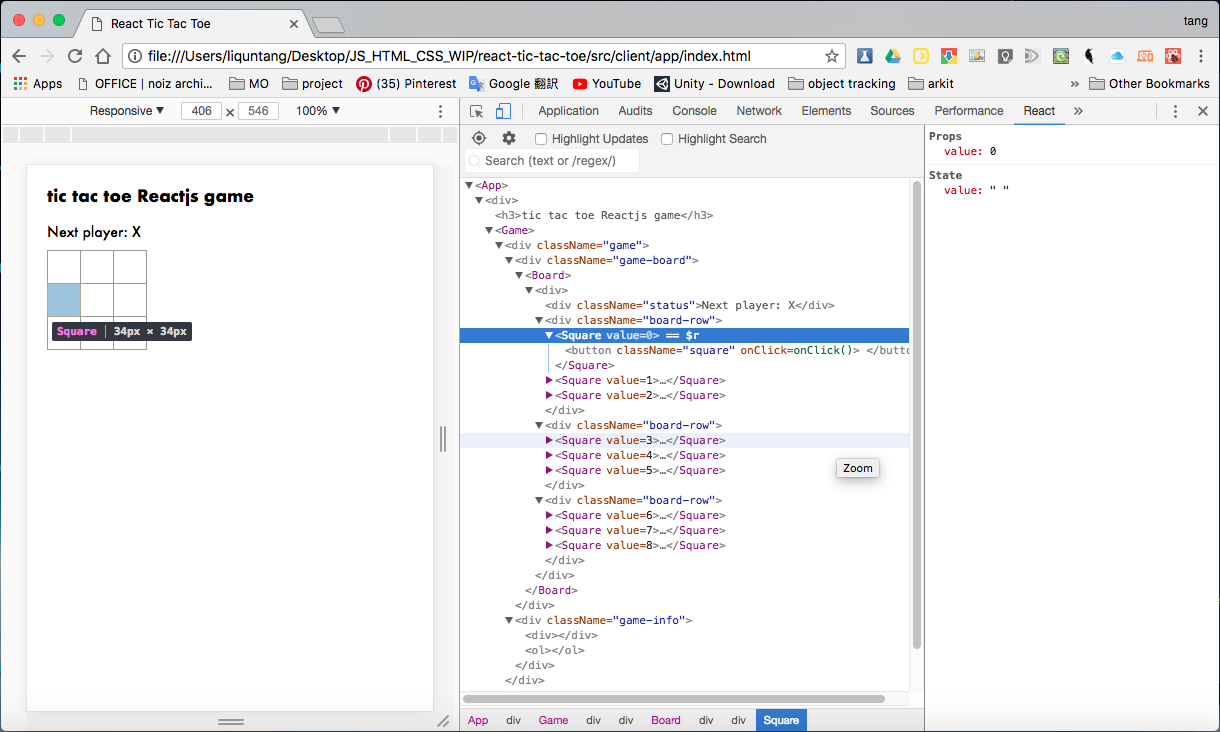
where to best store state and props data (if interaction outside of component needed)
When you want to aggregate data from multiple children or to have two child components communicate with each other, move the state upwards so that it lives in the parent component. The parent can then pass the state back down to the children via props, so that the child components are always in sync with each other and with the parent.facebook’s react app creator (like cookiecuter template)
React did some changes to Javascript
the heart of Javascript - DOM
- https://www.codecademy.com/articles/react-virtual-dom
- manipulating DOM is slow. most Javascript frameworks also UPDATE THEM MORE THAN THEY NEED TO
- checklist app
- when you tick one item, javascript rebuilds the ENTIRE list
- checklist app
- therefore React popularized something called virtual DOM
Virtual DOM
- more
- in React, for every DOM object, there is a corresponding virtual DOM object. a virtual DOM object is a representation of a DOM object (a lightweight copy)
- exactly same as DOM, but can’t change anything on the screen
- manipulating virtual DOM is much faster, like editing a blueprint, vs moving rooms in the entire house (DOM).
- when a JSX element is rendered, every single virtual DOM gets updated, then React compares the virtual DOM with the previuos virtual DOM, like Git, and only updates the changes.
- it is called diffing
Programming in React means constantly working with event listeners
Event Listeners
- onClick, onMouseOver and etc
- full list
- when you feed an event listener, its attribute must be a function (without brackets it seems)
<img src="#" alt="kitty" onClick={makeDoggy} />is valid
JSX is not compulsory to write React
You can write React code without using JSX at all!

The majority of React programmers do use JSX, and we will use it for the remainder of this tutorial, but you should understand that it is possible to write React code without it.

The following JSX expression:

const h1 = <h1>Hello world</h1>;
can be rewritten without JSX, like this:

const h1 = React.createElement(
  "h1",
  null,
  "Hello, world"
);
When a JSX element is compiled, the compiler transforms the JSX element into the method that you see above: React.createElement(). Every JSX element is secretly a call to React.createElement().

We won't go in-depth into how React.createElement() works, but you can start with the documentation if you'd like to learn more!
export default ComponentName, what is that?
why export default ?
- uses React convention, in that you can only export ONE component out of your single jsx file
- if you don’t use default, like
export ComponentName, then you have to call the component name explicitly, usingimport { ComponentName, AnotherComponentName } from 'myJSXFile.jsx';. notice that you can export MORE THAN ONE component this way. but it is not recommended. - if you use default, you are free to rename the components as whatever name you like.
A Basic Component
// this file is saved as component1.jsx
class HelloWorldComponent extends React.Component {
	render() {
		<div>
			<p>Hello World!</p>
		</div>
	}
}

// option 1
export default HelloWorldComponent;

// option 2
export HelloWorldComponent;
// export AnotherComponent;
//if you don't follow convention and write another component in this file
// you can still export them
then in the main file:
// option 1 - renamable component
import Jollywag from 'component1.jsx';  //means you can rename your component

// option 2 - multiple, non-renamable components
import { HelloWorldComponent, AnotherComponent } from 'component1.jsx';

// option 3 - both default and specific names
// you can rename the default export, but can't rename the non-default one
import HelloRenamed, { AnotherComponent } from 'component1.jsx';